

In this blog we’re going to cover the following topics and demonstrate how to optimise a LinkedIn company page for success:
- General maintenance
- Adding social posts
- Sharing prompts for company engagement
- Latest updates and advice
- Understanding analytics
What is success on LinkedIn though? Glad you asked! The simple answer is that LinkedIn want users to behave a certain way so they develop features to help steer users in that direction. Apart from job hunting, the main reason people use LinkedIn is because they want to buy or sell, and their customers or suppliers are also on the platform. The more leads and sales a company gets through LinkedIn, the more they will invest in the platform, which is what LinkedIn (and Microsoft) want.
Using the features well, understanding the algorithm, and knowing how to measure what works and what doesn’t, helps with getting sales through LinkedIn. Let’s look at how to do this in a bit more detail.
General maintenance for a LinkedIn company page
Keeping a LinkedIn company page up to date is important so any visitors can easily identify what information they need to, and progress down the sales funnel. Personal profiles are important because users usually have more personal connections and followers than a company page does. The company page is useful in its own right though. It may be found through searching for services or, in a lot of cases, because a person is promoting the page. When people find your company page, you want it to look good so make sure you’re making regular, good quality, updates to:
- Images
- Descriptions
- Employees
- Ethics and values
- Current jobs
- Call to actions
Adding social posts on a LinkedIn company page
Posting content on your company page is important to encourage engagement from your followers and employees. It’s the main way non-followers find new content and good content encourages them to engage which is exactly what you want. The right followers engaging with your content is important for the sales funnel.
Here are some ideas for content you can post:
- Behind the scenes
- Company news and accomplishments
- Job advertisements and careers advice
- Advice and guidance
- Testimonials and reviews
- POV and opinions
- Live events and Q&A’s
Content can take many forms. On LinkedIn there are capabilities for adding images, videos, and PDF’s, as well as hosting live events through the platform.
Sharing prompts for better company engagement
One of the most crucial elements for success on LinkedIn is engagement from your employees on updates from the company page. Unless you’ve got thousands of followers who engage without prompting, you will need engagement from your employees. This engagement sends a signal to LinkedIn, that your content is good, and that means the algorithm is more likely to show your content to more people. That’s how most LinkedIn audiences come across your page and your following grows.
When reposting content, LinkedIn gives two options, to “repost with your thoughts” or just “repost” and one of these is more desirable than the other. Reposting with your thoughts, is including your own words about why you are sharing the post, and this is the option that really makes a difference.
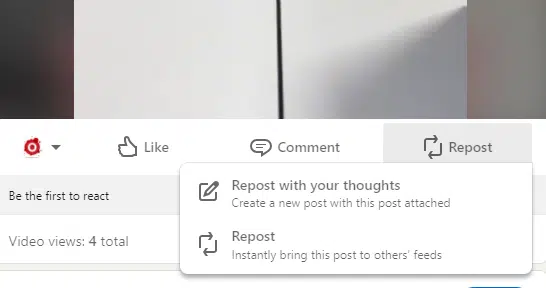
Employees not feeling like they have anything to add to socials posts is completely normal; we see it all the time. Here are some prompts and advice for encouraging this behaviour.
Employees can share content, they don’t need to come up with something original. It’s just a matter of adding some context to what they’re sharing.
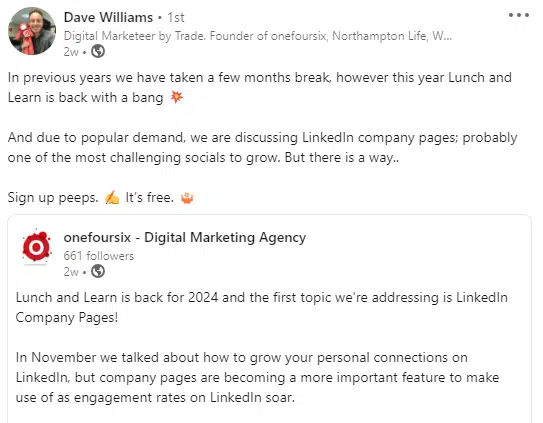
In the example below, we’ve shared a post from our company page about an upcoming webinar and Dave has shared it. He’s added just a bit of information but hasn’t added a link or hashtags so kept it simple.
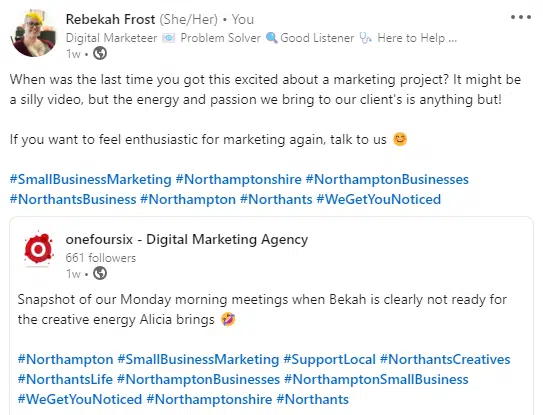
In this example, Bekah has provided a bit more detail and included hashtags and a link. The hashtags tell people more information about the topics and the link is an encouraging call to action.
Prompts to help employees share content on LinkedIn
The repost text can be as simple as “check this out from my colleagues” but here are some other suggestions you can also use:
“I’m excited to share our latest company update. Check out the insightful post by @colleague, shedding light on current industry trends and our innovative approach.”
“Exciting times at [Company Name]! Check out our post for an inside look at the innovative projects and initiatives shaping our future.”
“We’re growing, and we want YOU to be part of our journey! To all my followers, here are the details of an incredible job opportunity at our company. Take a look and explore the possibilities.”
“Explore the heart of our company with @colleague’s behind-the-scenes latest video. From brainstorming sessions to team celebrations, get an insider’s view of the moments that make [Company Name] unique.”
“Unlock the secrets to success in [industry] with our latest post. Packed with actionable advice and guidance, it’s a roadmap for any business looking to thrive in this dynamic field. Dive in and discover the keys to success.”
The point is, employees don’t need to put in a lot of effort or be confident writers, but even a repost as simple as Dave’s above, will make a difference if you have a good percentage of your team doing it.
Latest LinkedIn news, updates and tips
Are hashtags needed on LinkedIn?
We mentioned hashtags earlier in the blog, but the research prominent LinkedIn users have been doing show they may not be making a difference to reach and engagement anymore. By conducting tests, people are discovering that adding hashtags isn’t getting them the results they used to which suggests LinkedIn are reducing the impact and importance of hashtags.
An article by Andrew Hutchinson on Social Media Today, released in January 2024, dives into whether we need to be using hashtags on LinkedIn anymore. In the article, Andrew shares a response from LinkedIn that clarifies that “hashtags need to be closely related to the topic of the post to be most effective.” LinkedIn also say that users can use topics or hashtags for search for conversations about specific topics.
Andrew explains that hashtags are needed less because the algorithms have evolved to understand the whole context of the post, including identifying factors such as user history and visual components to categorise it. They give an example of mentioning Meta in the post text, probably means you don’t need to add #Meta as a hashtag too.
Further explanation from LinkedIn highlights that the platform isn’t “designed for virality” and that the algorithm can differentiate between posts that are only relevant to your connections, and posts that will interest a wider group of people, therefore it is more likely to share the latter type.
Should you use all the new LinkedIn features?
Another update, is that over the last couple of years LinkedIn have brought new features in for Company Pages so make the most of these.
Ensure the commitments and overview sections have been filled in and are kept up to date. This includes the specialities section and contact information. You might think they are up to date, but only by checking them can you be totally sure.
There is a function for notifying employees when the company post an update so it’s a good idea to ensure your employees are listing you as an employer.
Add a prominent or obvious call to action or lead button for visitors to your company page to click. Choose one with a CTA that makes sense, – don’t use “get a quote” if you don’t provide quotes.
Go to your company feed and interact with followers as your company. This is a really simple way of getting your logo seen.
A simple guide to understanding LinkedIn analytics
Analytics can seem a bit daunting but it’s important to track some metrics so you can understand if your approach is working.
Company pages have analytics that cover content, visitors, followers, leads, and competitors which can be sorted by date range and exported into .XLS files.
Content
The content section highlights reactions, comments, and reposts and a metrics dropdown menu lets you see the data of your page through:
- Impressions
- Unique impressions
- Clicks
- Reactions
- Comments
- Reposts
- Engagement rate
If you’re not sure where to start with tracking these, start by looking at the engagement rate. Where you see peaks, check out what people liked and use that knowledge to make similar posts. You could use this information to see if your followers preferred certain content, or a particular format.
Further down the content section you can see more detailed information on specific posts.
Visitors
This section highlights the number of page views, unique visitors and custom button clicks. The metrics section lets you see page views and unique visitors over time. Further down you can get to know the demographics of your visitors by job function, company, industry, location, and seniority. This is helpful because you can see if your visitors align with your target demographic. If they don’t, you know you need to adjust your social content to be more appealing for your target audience.
Followers
Followers are different to visitors because they are taking an extra step to follow your page and agree to see more of your content. Your follower highlights show your total and new followers as they are important to keep an eye on. You can also see the demographics of your followers in this section. They are split into the same categories as Visitors and it’s even more important that these match your target demographic.
Leads
This section appears if you have set up the leads contact form in settings. It gives you an overview of the status of each lead you’ve received. If you don’t have a lead generating form set up yet, do it; it’s a clear call to action for your page.
Competitors
LinkedIn chooses some competitors based on your follower and organic content metrics, but you can edit and choose the ones you want to compare yourselves to. This section shows you each competitor’s total and new followers, and total engagements and posts, and ranks your company page among them.
Metrics are important for measuring what works and what doesn’t. So, if you’re trying to optimise your LinkedIn company page and grow your LinkedIn following, knowing where you are to start with will help you measure that progress.
Refining your company page and seeing the benefits from it, won’t happen overnight, it requires a bit of effort and focus. Keeping the company page up-to-date and posting regularly adds value to your audience. Plus, LinkedIn say that these actions are more likely to result in engagement, because that is exactly what they have built the algorithm to look for.
LinkedIn regularly introduce new features and make changes to the algorithm. It’s thought that LinkedIn prioritises accounts that take up new features quickly, so it is worth using them in case that is true. In addition, it’s helpful to stay in the loop with LinkedIn news and there is enormous value to paying attention to your analytics.
Optimising your LinkedIn company page for success involves keeping it up to date with good content and information about your business and employees. This isn’t enough to grow your followers however, that is more likely to happen when your employees share the content from your optimised company page with their own connections. If you’d like support with any or all these steps, contact us here.
Watch the whole webinar recorded live on YouTube or below ⬇️
